
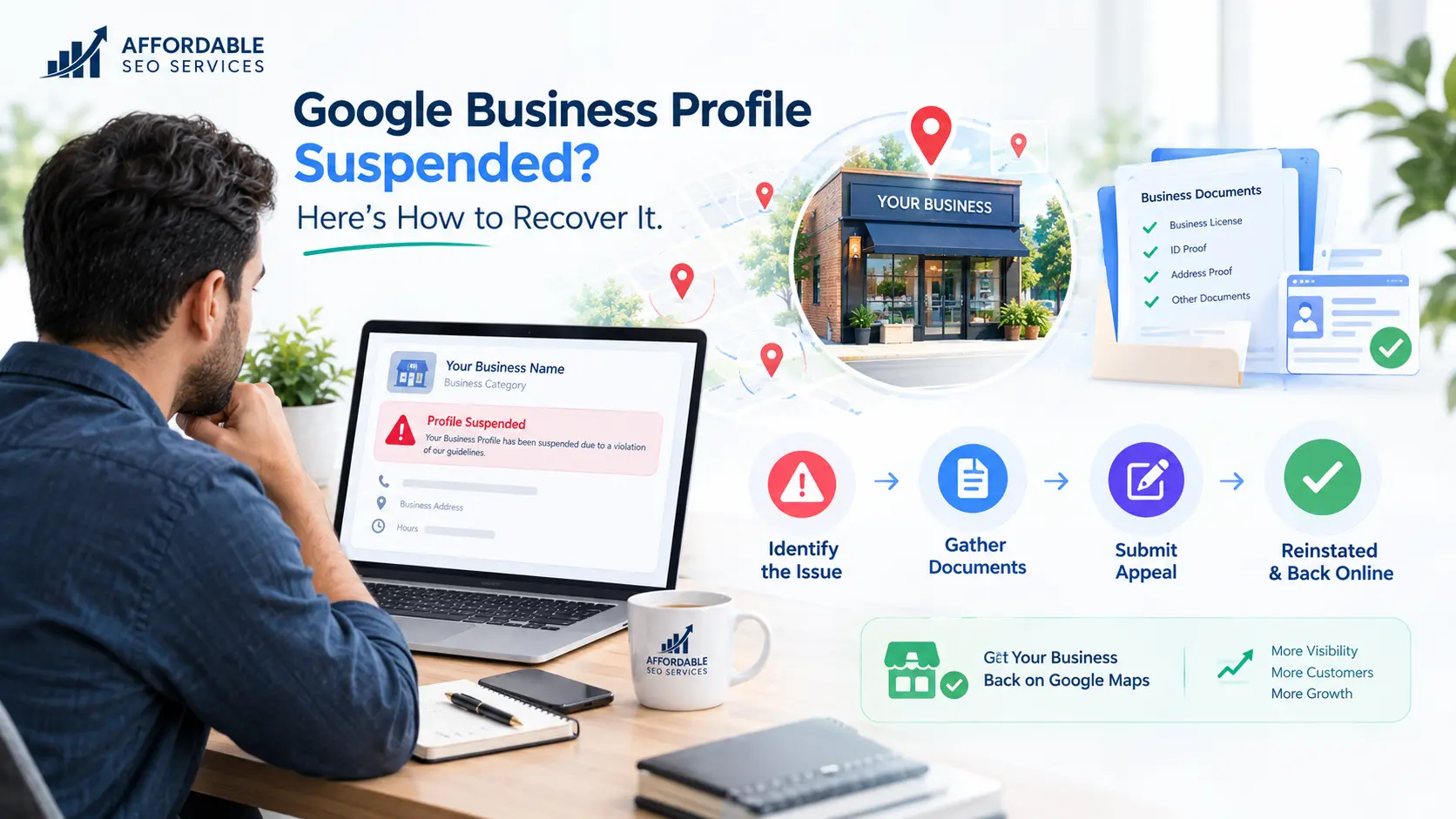
If your Google Business Profile is suspended, Google has flagged it for breaking its guidelines. A soft suspension keeps the listing visible but locks you out; a hard suspension removes it from Search and Maps. To recover it, fix the violation, gather documents that match your profile, and submit one appeal in the Google Business Profile appeals tool.
A suspended Google Business Profile can cut off calls and map traffic overnight, and the notice rarely explains why. The product used to be called Google My Business, so plenty of owners still search for “Google My Business suspended” when this happens. Whatever you call it, Many legitimate businesses can seek reinstatement by correcting the underlying issue and submitting an appeal with supporting evidence.
At Affordable SEO Services, local search visibility is a big part of the work we do for small businesses. This article gives you everything you need to handle the appeal yourself.
Key takeaways
- Don’t create a new profile. Google warns against it while your appeal is under review.
- Check your account first. If your Google Account is restricted, appeal that before the profile.
- Prepare before you open the form. Evidence must be uploaded within one hour of opening the evidence form.
- Make every detail match. The name and address on your documents should match your profile exactly.
- Plan for an open-ended wait. Google doesn’t publish a firm timeline for suspension appeals.
[IMAGE: Mockup of a Google suspension notice email | Alt text: Example of a Google Business Profile suspended email notification]
What Does It Mean When Your Google Business Profile Is Suspended?
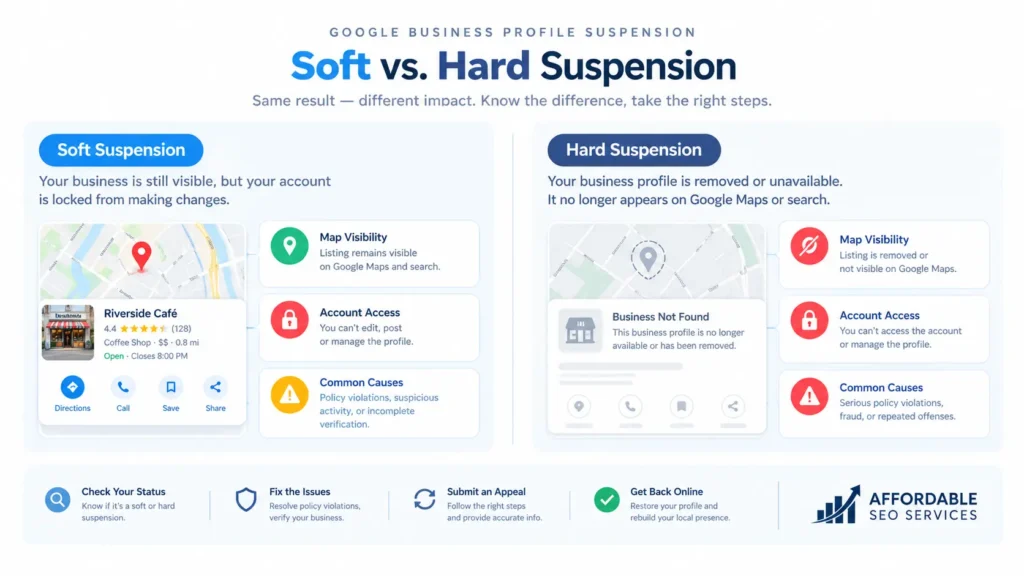
A suspension means Google has limited or removed your listing because it believes the profile breaks its rules. In local SEO circles, this gets shortened to “GBP suspended” or “GMB suspended.” All three phrases describe the same situation.
Soft Suspension vs Hard Suspension
Google doesn’t use these two terms officially. Practitioners created them, and they’re a quick way to judge how serious your situation is.
Soft suspension
Local SEO platform BrightLocal describes a soft suspension as a listing that still appears in search, but that you can no longer manage. The profile sits in an unverified state, open to edits or removal requests from other users.
Hard suspension
The listing is removed from Google and Google Maps, and it can lose its reviews entirely. It also disappears from the Local Pack, the group of map results that shows above regular results for local searches. For most local businesses, that’s where the majority of calls come from.
A hard suspension is the more serious of the two. Customers who search your exact business name won’t find you at all.
Is a Google Business Profile Disabled or Suspended?
For practical purposes, disabled and suspended profiles are the same problem. Google’s help page covers them together and sends both through the same appeals process. An account restriction is different, and you have to resolve it first.
| Status | What you see | Where to fix it |
| Soft suspension | Profile still shows on Maps, but you can’t edit it, reply to reviews, or post | Business Profile appeals tool |
| Hard suspension | Profile is gone from Search, Maps, and the Local Pack | Business Profile appeals tool |
| Disabled | Profile can’t be accessed in your dashboard | Business Profile appeals tool |
| Account restricted | Every profile you manage is suspended | Google Account restrictions page first, then the appeals tool |
What If Your Google Business Profile Account Is Restricted?
A restricted account suspends every Business Profile you manage, and you can’t create or claim new profiles until the restriction is lifted. You appeal the restriction from your Google Account’s My Account page, and only after it’s lifted can you appeal the profile suspension. Google explains the triggers in its Business Profile restriction policy.
How Can You Tell Which Problem You Have?
Four checks will tell you which kind of suspension you’re facing. Run them before you change anything, because the fix depends on the answer.
- Search your exact business name on Google Maps while signed out of your account. If the listing appears, you likely have a soft suspension; if it doesn’t, it’s a hard one.
- Open your Business Profile dashboard and read the suspension banner. Then find Google’s email and note the violation it names.
- Visit myaccount.google.com/restrictions to see whether your Google Account itself is restricted. If it is, fix that first.
- Review every owner and manager on the profile. Remove anyone you don’t recognize or who no longer works with you.
The appeals tool gives you more detail than the email. It shows the restricted profile, the reason for the moderation action, and a link to the policy you violated.
The owner and manager check matters more than most people expect. According to Google, if the owner’s account is removed, every location that account owns goes with it. If a manager’s account is removed, only that manager loses access, and the locations stay as they are.
When a user on the account is the cause, BrightLocal recommends one of two fixes before you appeal. Either swap in a new owner account (ideally one on Google Workspace) or remove all managers.
Why Was My Google Business Profile Suspended?
Most suspensions trace back to a guideline violation, a risky edit, or a problem with an account tied to the profile. Sometimes the owner did nothing intentionally wrong. Google rarely names the exact cause, so check each area below against the Google Business Profile guidelines.
Name, Address, and Hours Problems
Your business name should match your signage and your state registration, with nothing extra added. Adding your city or main service to the name (“Smith Plumbing Dallas Emergency Plumber”) is keyword stuffing. It’s one of the most common reasons listings get suspended.
Inconsistent NAP is another frequent trigger. NAP stands for your business name, address, and phone number. When those details differ between your profile, your website, and online directories, Google has less reason to trust that your business is real. Mismatched NAP details appear on nearly every list of common suspension causes.
Addresses cause plenty of trouble too. P.O. boxes, UPS Store boxes, and virtual offices such as Regus or Davinci are high-risk locations for a listing.
Coworking spaces aren’t banned outright. A shared space can work if someone from your business is there during your listed hours, your mail is delivered there, and your sign is posted. Service area businesses follow a separate rule. If you travel to customers, use your real address and hide it from public view in your profile settings.
Your listed hours should reflect when your physical door is open. Showing “open 24 hours” when the office isn’t staffed around the clock can get you flagged, even if a call center answers the phone overnight.
Editing Too Much at Once
Bulk edits are a classic trigger. That means changing your name, address, phone, and category in one session. Real businesses rarely change these details, so Google treats a burst of changes as suspicious.
BrightLocal suggests waiting about 60 seconds between edits. For core details like your name or address, spreading changes across separate days is safer still.
Suspended Right After Verification?
New profiles and freshly verified profiles get extra scrutiny. One 2026 industry analysis found that most suspended profiles were either brand new or recently edited. One business owner described a cycle where their profile was restricted, regained access through video verification, and then lost it again a few days later.
Video verification is where many of these problems start. Google requires a single recording that is unedited and continuous, with no breaks. It must be at least 30 seconds long and recorded and uploaded from a mobile device through your Business Profile. You can’t record the video offline and upload it later.
The video needs to prove three things. Your location has to match your profile address. Your business name and category have to match what you actually do. And you have to show you’re authorized to represent the business.
If the name on your sign differs from the name on your profile, or the recording cuts from outside to inside, expect a flag. Google’s video verification instructions cover the full requirements.
Duplicate Listings and Shared Details
Several patterns raise suspension risk. These include multiple listings for the same business, several listings at one address, and the same phone number used on several profiles.
Some businesses legitimately share an address. If that applies to you, keep legal proof ready showing the other business really exists there.
Problems With a Connected Account
Your profile can go down because of someone else. If an agency or contractor with a record of violations has access to your profile, their account problems can spread to yours. When a Google account is suspended, every listing in that account usually gets suspended along with it.
Reports From Customers or Competitors
Anyone can flag your listing through the Suggest an Edit feature on Google Maps. Manual suspensions happen when a Google employee reviews a report, often one filed through the spam redressal form, and decides the business shouldn’t be listed. Competitors do use this system. A virtual office address makes you an especially easy target.
Automated Sweeps and High Risk Categories
Some industries draw more attention than others. BrightLocal describes an algorithmic sweep in June 2019 that targeted categories prone to fake listings, such as locksmiths and plumbers. Treat this as a pattern, not a rule. Google doesn’t publish which categories it’s watching at any given time.
Content and Website Issues
Google’s systems now check more than your name and address. Olly Olly reports that Google’s AI looks for promotional language in business descriptions, contact details, and social handles written into text, and text-heavy or duplicate images. Malware on your website is also a known risk factor.
What Should You Avoid After a Suspension?
Creating a new profile is the biggest mistake you can make. Google tells owners not to create a new Business Profile for the same business while an appeal is under review. BrightLocal warns that a replacement listing can cost you every review and all the ranking strength the original built up.
Rewriting the whole profile at once is almost as risky. Fix what’s actually wrong, but make changes gradually so you don’t repeat the pattern that may have caused the suspension.
Filing several appeals slows everything down. Google asks owners not to submit multiple appeals for the same issue before a decision arrives. Emotional appeals don’t work either. Google wants facts, not the story of your lost revenue or how much you spend on ads.
How to Fix a Suspended Google Business Profile Step by Step
Fixing a suspended profile comes down to a clean Google Business Profile appeal, which some owners still call a reinstatement request. Get your documents ready before you open the tool, because a timer starts once the evidence form opens.
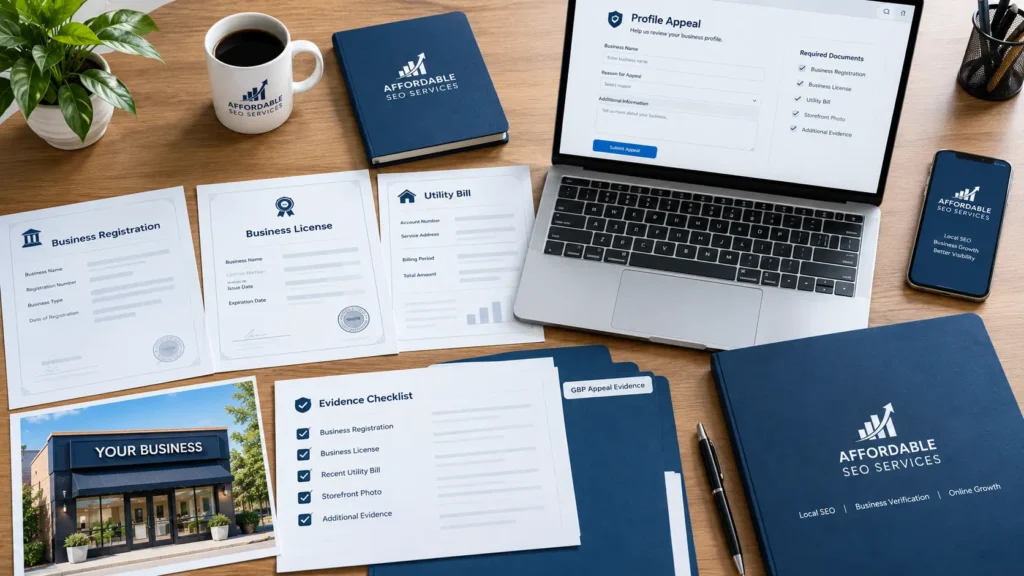
Gather Your Evidence Before You Start
Google lists these types of evidence as helpful for an appeal:
- Official business registration
- A business license
- Tax certificates
- Business utility bills, such as electricity, phone, water, or internet
Check that the business name and address on every document match the profile you’re appealing. Small differences count. “Suite 200” on your license and “Ste 200” on your profile is worth fixing before you submit.
Photos of your signage and storefront add weight, since they show the business exists in the real world. If you have more than two documents, zip them into one upload.
Submit Your Appeal in the Appeals Tool
These steps follow Google’s official appeal process.
- Fix every guideline issue on your profile before you start.
- Open the Google Business Profile appeals tool while signed in to the account that manages the profile.
- Confirm you’re in the right account, or switch to the correct one.
- Select the suspended profile and read the reason and the violated policy.
- Click Submit Appeal, then select Add evidence right away.
- Upload your documents and explanation within one hour, then submit.
Most people miss that one-hour limit. Google says evidence not submitted within 60 minutes of opening the form won’t be attached to your appeal.
After you submit, the tool shows one of five statuses: Submitted, Approved, Not Approved, Can’t be appealed, or Eligible for appeal.
How to Write Your Appeal Explanation
According to BrightLocal, you have roughly 1,000 characters to make your case. Use them to state facts and describe the changes you made to comply. If you did break a rule, say so plainly. Admitting the mistake and showing the fix is usually more convincing than arguing.
Here’s a template you can adapt:
[Business name] is a [type of business] operating at [full address] since [year]. We serve customers [at this location during our listed hours / at their homes across (service area), and our address is hidden]. After receiving the suspension notice, we reviewed the Google Business Profile guidelines and made these changes. [Change one, for example, we removed the city name from our business name so it matches our signage and state registration.] [Change two.] The attached documents show our business name and address exactly as they appear on the profile. They include our [business license or state registration], a [month and year] utility bill, and photos of our permanent signage. We ask that you review the profile for reinstatement.
Brands With More Than 10 Locations
Brands with many locations have a separate route. Select one profile in the appeals tool, answer yes when asked whether the appeal covers more than 10 profiles, and attach a spreadsheet. The spreadsheet should list evidence and the Business Profile ID for each location.
Only the profile you selected will show a status update in the tool, and you’ll receive a single decision email for it.
How Long Does Google Business Profile Reinstatement Take?
Google doesn’t publish a firm timeline for suspension appeals. Its help page says only that Google will review your appeal and email you a decision. A separate Google page says content appeals can take up to five business days, but that covers content decisions, not full profile suspensions.
Practitioner estimates vary. Olly Olly puts the usual range at one to three weeks, sometimes longer. One 2026 review of ranking articles found that the timelines they quoted contradicted each other, and none came from Google.
The honest answer is that nobody outside Google knows. Plan for an open-ended wait, don’t promise staff or customers a return date, and check both the appeals tool and your inbox regularly.
What Happens If Your Appeal Is Denied?
You can request an additional review and include evidence you didn’t send the first time. Google’s additional review form is available only for requests that have already been denied. Businesses in the European Economic Area may have extra redress options under the EU’s Digital Services Act.
Treat this as your last clear chance. BrightLocal cautions that in some cases you get only two chances at reinstatement. Some suspensions are also marked as unable to be appealed, which can happen when the account user is a known spammer.
A second opinion helps at this stage. The Google Business Profile Help Community has volunteer Product Experts who can review your listing if you share your business name, your verified address, and a screenshot of your info tab. If you’d rather have a specialist check everything before your second attempt, the team at Affordable SEO Services can audit your profile and help prepare your evidence.
Be careful with anyone who promises guaranteed reinstatement. Only Google decides whether a profile comes back.
What Should You Check After Reinstatement?
Check everything, because a reinstated profile doesn’t always come back the way it left. When web design agency Design Powers got its profile back, it showed no ratings or reviews. Weeks later, after uploading new photos, the profile was disabled again and eventually merged with a business that had a similar name.
In that case, the live and disabled versions of the profile ended up with mismatched Business Profile IDs and CIDs. A CID is a unique identifier Google assigns to each listing. The case is extreme, but it shows why a careful review is worth the time.
Check these right away:
- Your review count and your replies to reviews
- Business name, address, map pin, and phone number
- Categories, services, and photos
- The list of owners and managers
If anything looks wrong on a reinstated profile, Google directs you to Business Profile support. Take screenshots of the full profile now, and edit slowly after reinstatement, one field at a time.
What Can You Do While Your Profile Is Suspended?
Keep customers finding you through channels you control. Put your phone number, address, and hours at the top of your homepage and contact page. Then update Bing Places, Apple Business Connect, Yelp, and any industry directories so your details match your Google profile exactly.
Paid search can keep some calls coming while you wait. If you run Google Ads, point campaigns at your website instead of your profile. If you use Local Services Ads, check that account for notices too, since it relies on the same business details.
Tell your regular customers as well. A short email or social post saying you’re open as usual prevents confusion if they notice you’re missing from Maps.
Design Powers drew a broader lesson from its experience. Don’t depend only on a Google Business Profile or any platform you don’t control, and build assets you own, starting with your website.
How Can You Prevent Another Suspension?
Prevention mostly means presenting your business exactly as it is: a real business at a real location.
- Match your name to your signage and registration, with no added keywords.
- Use a real, staffed address. If you serve customers at their locations, hide your address.
- Change one core detail at a time, and space out edits to your name, address, phone, and category.
- Audit owners and managers every few months, and remove anyone who no longer needs access.
- Keep records current in state business directories, city license records, and professional registries.
- Refresh your Street View imagery. Hiring a Street View photographer can update how your signage appears on Google.
- Keep an evidence folder ready, with a current license, a recent utility bill, and storefront photos.
Prevention lowers your risk but doesn’t remove it. Automated checks and user reports can still flag a profile that follows every rule. A clean profile and documents you can produce quickly make the appeal far easier when that happens.
Getting Your Google Business Profile Back
A Google Business Profile suspended notice feels final, but it rarely is. Your first appeal carries the most weight. Fix the real violation, make every document match your profile exactly, and submit once within the one-hour window.
If you want a second set of eyes before you submit, contact Affordable SEO Services for a profile review.
Frequently Asked Questions
How long does it take to fix a suspended Google Business Profile?
Google doesn’t publish a timeline for suspension appeals. Practitioners commonly report anywhere from a few days to a few weeks.
Why was my Google Business Profile suspended for no reason?
There’s almost always a trigger, even when Google doesn’t name it. Common hidden causes include a restricted manager account, a user report, or a recent edit.
Can I create a new Google Business Profile if mine is suspended?
No. Google says not to create a new profile for the same business while your appeal is under review.
Will I lose my reviews if my profile is suspended?
A suspension can temporarily affect the visibility or accessibility of your profile and its reviews. After reinstatement, check that your review history has returned correctly.
Why was my profile suspended right after verification?
New and newly verified profiles get extra scrutiny, and a mismatch between your video and your profile details can trigger a flag. Fix the mismatch, then appeal with documents.
How many times can I appeal a suspension?
You file one appeal and can request an additional review if it’s denied. Some suspensions are marked as unable to be appealed.
Where is the Google Business Profile reinstatement form?
Appeals now go through the Google Business Profile appeals tool. A separate form exists only for requesting an additional review after a denial.
Can a competitor get my Google Business Profile suspended?
A competitor can report your listing, which may lead to a review. Profiles that follow the guidelines and have matching documents are far easier to reinstate.
What does “Google business suspended” mean on my dashboard?
It means Google has flagged your Business Profile for a guideline issue and limited or removed it. Open the appeals tool to see the reason.
Should I pay someone to handle my appeal?
It can help after a denial or when multiple locations are involved. No one can guarantee reinstatement, because only Google decides.